Verschieben und Rotieren
| Startszene |
#declare Platte = box   { <-1,-0.1,-1> <1,0.1,1> pigment{ color rgbt <1,1,0,0.4> } }
light_source{ <0,50,0> color rgb 1 }   // Licht liegt 50 über dem Ursprung!
sphere{ 0, 0.05 }                      // schwarze Kugel im Ursprung
plane { y, -1 pigment{ color rgb 1 } } // Boden liegt 1 unter dem Ursprung!
object{ Platte }                       // Platte, enthält Ursprung als Zentrum
camera{ location <0,1,5> look_at 0 }
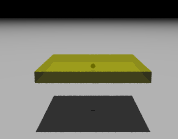
Box mit Mittelpunkt im Ursprung
| Verschobene Platte |
#declare Platte = box   { <-1,-0.1,-1> <1,0.1,1> pigment{ color rgbt <1,1,0,0.4> } }
light_source{ <0,50,0> color rgb 1 }   // Licht liegt 50 über dem Ursprung!
sphere{ 0, 0.05 }                      // schwarze Kugel im Ursprung
plane { y, -1 pigment{ color rgb 1 } } // Boden liegt 1 unter dem Ursprung!
object{ Platte translate <0,0.5,0> } // 2. Platte, nach oben verschoben
gedreht
camera{ location <0,1,5> look_at 0 }
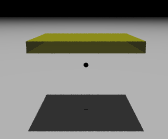
Verschobene Platte
| Gedrehte Platte |
#declare Platte = box   { <-1,-0.1,-1> <1,0.1,1> pigment{ color rgbt <1,1,0,0.4> } }
light_source{ <0,50,0> color rgb 1 }   // Licht liegt wieder 50 senkrecht über dem Ursprung!
sphere{ 0, 0.05 }                      // schwarze Kugel im Ursprung
plane { y, -1 pigment{ color rgb 1 } } // Boden liegt 1 unter dem Ursprung!
object{ Platte rotate <0,0,45>  }    // 3. Platte um 45° bzgl. z-Achse gedreht
camera{ location <0,1,5> look_at 0 }
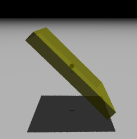
Platte, 45° um z-Achse gedreht
| Aufgabe |
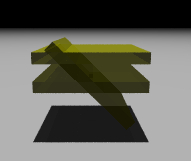
3 Platten zusammen